Digital updates: April 2026
Categories:
7 minute read
NotebookLM has expanded its usage limits, unlocking more sources, queries, and content generation across the board. It’s also been a bumper month for Google Vids, with new tools for custom music, avatar creation, screen recording, and publishing directly to YouTube.
Elsewhere, Gmail now lets you share emails directly into Chat, and Canva unveiled a major AI upgrade and a new education platform—Learn Grid—at its annual Create event.
NotebookLM
Higher usage limits
Education Plus users now have access to expanded NotebookLM usage limits—this includes everyone at Outwood. The upgrades include:
- More sources per notebook
- More chat queries per day
- More flashcard sets and quizzes
- More Video Overviews, Audio Overviews, infographics, and slide decks
NotebookLM features and limits (Outwood users fall under the More access column).
Student access
NotebookLM is now available to Outwood students in years 10–13. Following feedback, we extended access to students in year 10 after the Easter break. They now join students in years 11–13, who have had access since February.
Students can find NotebookLM on the Google apps (9-dots) menu. They can create their own notebooks or use ones with curated resources shared by staff.
You can share notebooks with students as classwork in Google Classroom.
Students cannot generate slides, infographics, Deep Research reports, or use interactive mode for audio overviews. They can view any slides or infographics in notebooks you share with them.
Google educator certifications
Want to expand your skillset and gain confidence in using Google tools? Google offers self-paced online training and a certification exam to become a Google Certified Educator.
The Educator Level 1 and Educator Level 2 exams are both free until June 2026.
Google Vids
Generate custom music
You can now generate original background music for your Vids projects using a text prompt. Describe the style, mood, or feel you’re after—Vids will create a custom track to match. Both short clips (around 30 seconds) and longer tracks (up to three minutes) are available.
Create and refine custom avatars
You can now design fully custom AI avatars in Google Vids. Rather than choosing from a preset gallery, you describe the look you want—background, outfit, and appearance—and Vids generates it. Refine the avatar by requesting specific changes, such as adding accessories or adjusting the setting, and choose from seven voices to pair with it.
Use AI avatars in Google Vids.
Export directly to YouTube
You can now publish a completed Vids project to YouTube in a few clicks from the File menu. All exported videos start as Private, giving you a chance to review them in YouTube Studio before publishing.
Screen Recorder Chrome extension
A new Google Vids Screen Recorder extension for Chrome lets you start a screen recording directly from the Chrome toolbar—no need to open Vids first. Record up to 30 minutes, then preview and edit the recording in Vids when you’re done.
Pin the extension to your Chrome toolbar for fastest access—particularly worthwhile if you record your screen regularly.
Install the Google Vids Screen Recorder extension.
Edit AI scripts when converting Slides to Vids
When importing a Google Slides presentation into Vids with Gemini enabled, you can now review and edit the AI-generated script for each slide before the video is created. Previously, you could only adjust scripts after the import had finished.
Convert Google Slides to Google Vids.
More expressive voiceovers in more languages
AI voiceovers in Google Vids now include 30 new voice options with improved naturalness and realism. You can shape the delivery using instructions in the script—for example, “Read this like you’re excited”—or control pacing with bracket notation: “This [pause] is the key point.”
Voiceover support has also expanded from 8 to 24 languages. New additions include Arabic, Bengali, Dutch, Hindi, Indonesian, Polish, Romanian, Russian, Tamil, Telugu, Thai, Turkish, Ukrainian, and Vietnamese.
Create voiceovers with AI in Google Vids.
Gmail
Share emails in Google Chat
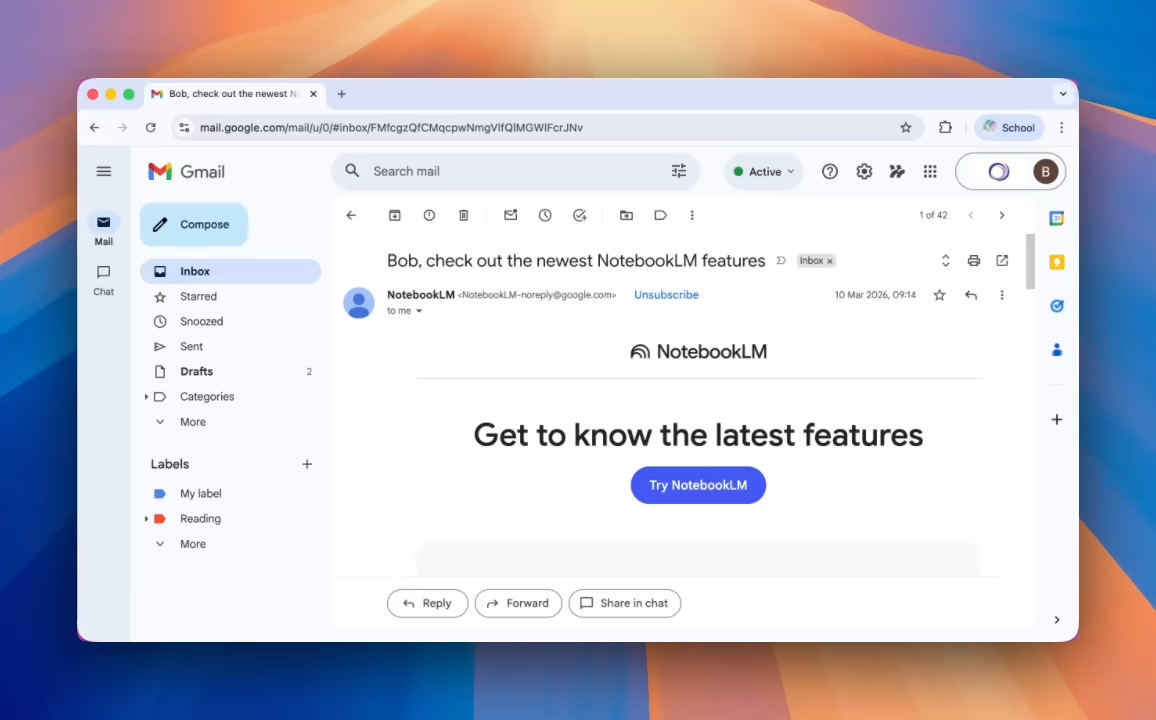
You can now share a Gmail thread directly into a Google Chat direct message or space. Starting from any email, click the Chat icon to send it to a colleague or group—the email appears as a link in Chat so that recipients can open the original message directly.
This makes it easy to switch from email to Chat for a live discussion without losing the thread. It’s also useful for looping in a different group of people before replying.
Gemini app
Longer music tracks
Since February’s update, the Gemini app has been able to generate 30-second custom music clips. You can now create longer tracks—up to three minutes.
The upgraded AI model understands musical structure more deeply, so you can prompt for specific song elements like verses, choruses, and bridges. Select Create music from the tools menu to try it.
Gemini’s “Fast” model is limited to 30s music clips. To create longer tracks, switch to “Thinking” or “Pro”.
Gemini app for Mac
The Gemini app is now available as a native desktop app for macOS 15 and above. Once installed, you can open Gemini from anywhere on your Mac using Option + Space—without switching away from what you’re working on. You can also share any window with Gemini, so it can help you with exactly what’s on your screen.
Google Classroom
Gemini is available in all Classroom languages
Gemini tools in Google Classroom—previously only available in English—are now rolling out to all languages supported by Classroom and Gemini. Teachers can now use Gemini to outline lesson plans, generate quizzes, write informational texts, and translate content in their preferred language.
Gemini in Google Classroom is only available to staff accounts. This update is rolling out gradually and may not yet be visible to all users.
Google Forms
Help me create in more languages
The Help me create feature in Google Forms is now available in 21 additional languages, including French, German, Italian, Spanish, Portuguese, Japanese, and Korean. Gemini-powered question suggestions have also expanded to 28 more languages.
Create a form with Gemini in Google Forms.
Google Meet
Better video quality on high-resolution displays
Google Meet now delivers sharper, more detailed video for users on high-resolution screens when joining meetings on the web. The improvement is most noticeable in meetings with three or more participants. Meet will automatically reduce resolution if bandwidth is limited.
This update is rolling out gradually and may not yet be visible to all users.
Canva
Canva AI 2.0
Canva unveiled a major AI upgrade at its annual Create event. The headline feature is conversational design: describe what you want to create in plain language, and Canva AI builds it for you. Everything it generates consists of individual, editable layers—so you can change any part without affecting the rest.
A new Memory Library lets Canva learn your preferences over time, keeping designs consistent with your style.
Canva AI 2.0 is currently rolling out gradually and may not yet be available to all users.
Discover new launches in Canva.
Learn Grid
Learn Grid is a new education platform in Canva, free for all schools. It offers thousands of curriculum-mapped resources and AI-powered lesson planning tools in more than 16 languages.
A standout feature for teachers is the ability to generate multiple versions of the same lesson at different difficulty levels, making it easier to plan differentiated sessions without extra preparation time.
Adobe Express
Transform photos into product shots
The AI Assistant in Adobe Express can now automatically enhance a photo with studio-quality lighting, a cleaner background, and improved composition—useful when creating posters or display materials. Find this in the Edit Image page or the Image Effects panel.
Learn about the AI Assistant in Adobe Express.
Other updates
Also in this release: auto-generated video captions can now be repositioned on the canvas to avoid covering key content, and tables in imported PDFs keep their original structure and stay fully editable.