Digital updates: March 2026
Categories:
5 minute read
It’s been a particularly good month if you use NotebookLM: saved chat history, new infographic styles, and slide deck revisions are all now available. Beyond AI, there are also handy updates to Google Chat, Calendar, Adobe Express, and Canva.
NotebookLM
Revise your slide decks
After generating a slide deck, you can now ask for revisions—fix a factual detail, change the tone, or adjust the layout—and NotebookLM regenerates the deck based on your feedback.
Generating slide decks is only available to staff accounts.
Generate a slide deck in NotebookLM.
Choose an infographic style
When generating an infographic from your notebook sources, you can now choose from ten predefined visual styles: Sketch Note, Kawaii, Professional, Scientific, Anime, Clay, Editorial, Instructional, Bento Grid, and Bricks. NotebookLM will still auto-select the best style if you prefer.
Generating infographics is only available to staff accounts.
Generate an infographic in NotebookLM.
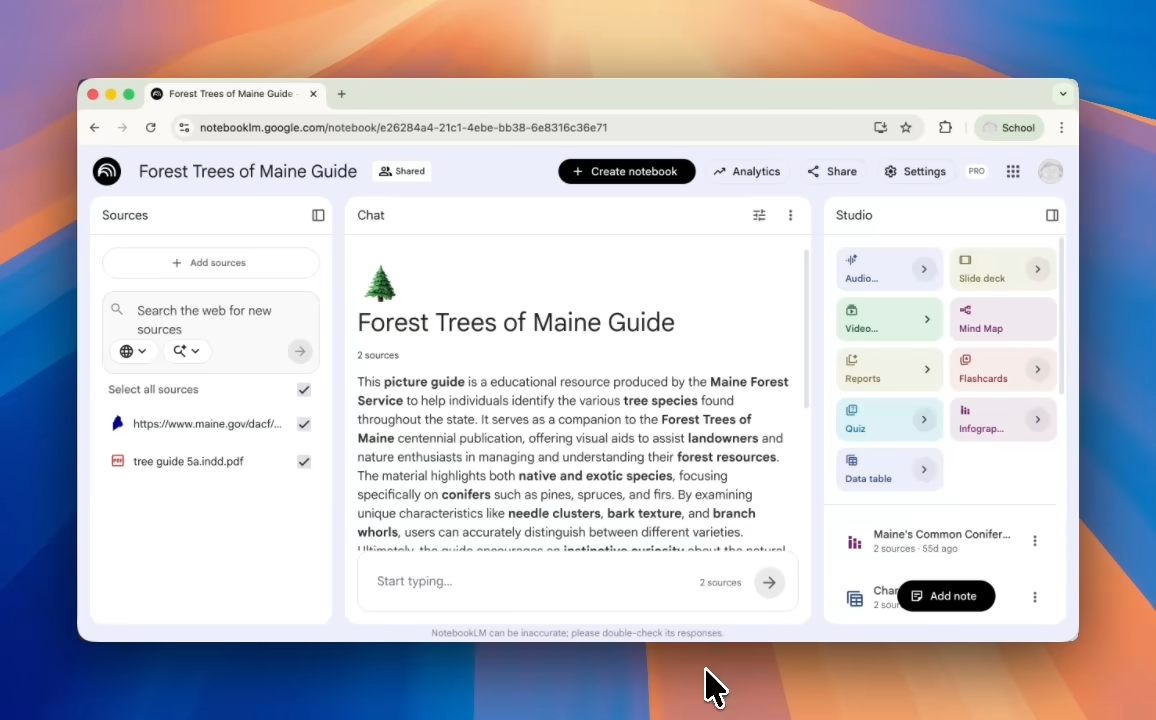
Improved flashcards and quizzes
NotebookLM now saves your progress in Flashcards and Quizzes between sessions. You can mark cards as “Got it” or “Missed it”, shuffle the deck, view a results screen, and delete specific cards.
Upload eBooks as a source
NotebookLM now supports EPUB files (the standard eBook format) as a source type, making it easier to import and explore digital books.
Saved chat history
Your chat conversations in NotebookLM are now automatically saved, so you can return to a notebook and pick up where you left off. Each conversation is private to you, even in shared notebooks.
Create content directly from chat
You can now ask NotebookLM to create Audio Overviews, Video Overviews, reports, and more directly from within a chat conversation—without having to switch to the Studio panel.
Gemini in Google Workspace
Conversation history in the side panel
The Gemini side panel in Google Docs, Sheets, Drive, and other Workspace apps now saves your conversation history between sessions. You can return to a document and continue a previous Gemini conversation without starting from scratch.
History is saved per app—your Docs history won’t appear in Sheets—and is only visible to you.
This feature is rolling out gradually and may not yet be visible to all users.
Learn about Gemini in Google Workspace.
Gemini app
Improved image generation
The Gemini app now uses Nano Banana 2—Google’s most capable image model to date—for image generation.
Key improvements include more accurate rendering of specific subjects, consistent characters across a sequence of images, clearer text within images, and sharper, higher-detail results overall.
Generate images in the Gemini app.

Google Vids
Cartoon-style AI avatars
Google Vids has added new 2D and 3D cartoon-styled avatars alongside the existing photorealistic options. These more expressive, approachable styles can work well for educational content.
Use AI avatars in Google Vids.
AI avatars and voiceovers in more languages
AI avatars and voiceovers in Google Vids now support seven languages in addition to English: French, German, Italian, Korean, Portuguese, Spanish, and Japanese.
Create voiceovers with AI in Google Vids.
Longer video projects
Google Vids has significantly increased its video length limits:
- Projects: Maximum project length increased from 10 minutes to 30 minutes.
- Recordings: You can now record clips up to 30 minutes in the Vids recording studio.
- Imported clips: You can import video or audio files up to 95 minutes long (or up to 4 GB in size).
Google Vids storage and length limits.
Google Chat
New Meetings section
You can now create a dedicated Meetings section in your Google Chat conversation list, separate from your direct messages and spaces. Once set up, meeting chats automatically move into this section after a call ends—giving you a persistent place to review notes and continue follow-up conversations.
To enable it, click the three-dot menu on any section of your Chat list and choose Create a meeting section.
This update is rolling out gradually and may not yet be visible to all users.
Google Calendar
Search for a time zone by city or country
The time zone picker in Google Calendar has been improved: instead of scrolling through a long list, you can now type a city or country name to find the right time zone quickly.
Use Google Calendar in different time zones.
Better layout on large monitors
Google Calendar on the web now makes better use of the space on large or high-resolution monitors. Events are more readable, with short meetings given more room, and the layout adjusts to prioritise typical working hours. This improvement also applies to the Calendar side panel in Gmail and other Workspace apps.
This update is rolling out gradually and may not yet be visible to all users.
Adjust event colour and density in Google Calendar.
Google Drive
Updated video player on iPhone and iPad
The updated Google Drive video player—which launched on Android in 2025—is now available on iPhone and iPad as well. It provides a cleaner, more modern viewing experience for videos stored in Drive on iOS devices.
Store and play video in Google Drive.
Adobe Express
Auto captions for videos
You can now generate subtitles for videos directly within the Adobe Express editor. After generating captions, you can edit the transcript and choose a caption style to suit your design.
Generate captions in Adobe Express.
HEIC image support
Adobe Express now accepts HEIC image files (the default format used by iPhones and iPads) when importing images. This means you can upload photos taken on iPhones and iPads without converting them first.
Canva
Draw and annotate during presentations
Canva now lets you draw, highlight, and annotate directly on your slides while presenting. Circle a key term, underline an important phrase, or sketch a quick diagram on the fly without switching to another tool.
Image to Video
You can now transform a still image into a short video with natural motion using AI in Canva. Select an image in your design and choose Image to Video to bring it to life.
Magic Layers
Magic Layers is a new AI tool that separates a flat image into individual editable layers, letting you individually edit specific elements within an image.